Tampilkan postingan dengan label BBM for Android. Tampilkan semua postingan

Selasa, 05 November 2013

How to Use 2 BBM PIN on 1 Android Device

How to Use 2 BBM PIN on 1 Android Device - Many request to post an Apps to make 2 BBM Application in 1 Android Device. Today, i post it for you. Hope you like and use it wisely. :)


If you dont know How to Install, follow this simple steps:
- Download the APK File, link below.
- Install APK File, after it you will see 2 BBM Icon on your Android Device.
- Open BBM Application, you can register for a new BBID or just Sign In.
- Enjoy ^^ 

2 BBM PIN on 1 Android Device

Size: 12.8 MB
Version: 1.0.0.72

I just tested on Xperia Z1 and Galaxy Tab 2 7".
Plz after you install this app, give your review on comment box below.
Credit to blackmonk88

Download How to Use 2 BBM PIN on 1 Android Device

Sabtu, 26 Oktober 2013

Menjalankan BBM di PC dengan emulator Android

Menjalankan BBM di PC dengan emulator Android - Akhirnya BlackBerry Messenger telah hadir di Google PlayStore sehingga para pengguna Android sudah bisa berBBM ria dengan menginstal aplikasi BBM for Android. Nah, sekarang bagaimana bagi orang yang selama ini lebih banyak bekerja menggunakan PC yang ber-OS Windows, apa bisa ikut meramaikan dunia BBM? Tentu saja 1500% bisa, caranya dengan bantuan emulator Android.

Menjalankan BBM di PC dengan emulator Android

Tutorial ini akan menuntun Anda pelan-pelan untuk melakukan instalasi emulator Android di Windows, yang untuk contoh kali ini digunakan OS jadul yang lumayan stabil yaitu Windows XP Smile Setelah instalasi emulator dilanjutkan dengan tutorial menginstal aplikasi BBM for Android sekaligus cara mendapatkan Pin BBM untuk bisa chating dengan user BBM lainnya.

A. Instalasi Emulator Android
1. Buka http://developer.android.com/sdk/index.html

2. Klik tombol Download the SDK

3. Pilih versi 32bit atau 64bit, sesuaikan dengan OS Windows Anda.

4. Ekstrak file hasil download ke drive (bebas drive apa saja), dan biar tidak terlalu panjang silakan nama direktorinya diubah sesuai keinginan.


5. Masuk ke folder eclipse dan jalankan eclipse.exe


6. Pilih direktori kerja kemudian tekan OK


7. Pilih menu Window – Android Virtual Device Manager


8. Tekan tombol New… dan buatlah Android Virtual Device baru dengan nama dan parameter seperti yang tampak pada gambar di bawah ini, kemudian tekan tombol OK.


9. Tekan tombol Start… dan dilanjutkan tombol Launch untuk menjalankan AVD


10. Setelah beberapa lama akan tampil emulator Android (AVD) seperti gambar di bawah ini :


B. Instalasi aplikasi BBM for Android
1. Buka browser pada AVD dan ketikkan di kolom url:
http://bb.prohp.net/files/BBM/Android/BBM%201.0.0.72%20PROHP.NET.apk
sehingga emulator akan otomatis melakukan download file APK BBM for Android.


2. Setelah proses download selesai klik 2 kali file tersebut untuk menginstal aplikasi BBM for Android.


3. Tekan tombol Next terus

4. Tekan tombol Install dan tunggu sampai aplikasi selesai ter-instal.

Jika sudah sampai tahap ini, maka Anda berhasil menginstal aplikasi BBM for Android di PC Anda.

C. Mendapatkan PIN BBM
1. Untuk mendapatkan PIN BBM kita buka terlebih dulu aplikasi BBM for Android.

2. Setelah muncul seperti tampilan dibawah, isi kolom kosong dengan email masing-masing atau ketik saja emailanda@gmail.com.


Demikian tutorial instalasi BBM di PC via emulator Android ini. Monggo dibaca, dipraktekkan dan diajarkan ke yang lain. Jika ada permasalahan silakan dituliskan di kolom komentar dibawah, jika saya bisa dan ada waktu akan saya jawab, jika tidak bisa mohon bantuan teman semua untuk ikut membantu teman kita yang masih sama-sama belajar. Semoga bermanfaat untuk Semua. :)
Credit: Alhy

Kamis, 24 Oktober 2013

BBM v1.0.0.72 for Android

BBM v1.0.0.72 - The OFFICIAL version of BBM™ from BlackBerry is now here for Android. Get the free BBM app for the best way to stay connected with friends and family. Download it now.

BBM for Android

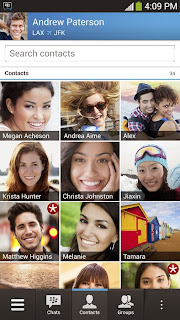
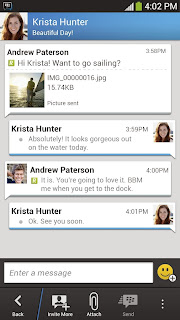
Chat with friends on Android, BlackBerry and iPhone:
• BBM is always on and always connected – no app to open
• Know when messages have been delivered (D’s) and read (R’s)
• Share photos, files, documents, voice notes and more
• See when contacts are responding to your message
• Emoticons for every mood and emotion let you express yourself

BBM lets you protect your privacy. You control it:
• You chose how to share your information - BBM uses PINs instead of phone numbers or email addresses so that it's more private, and you always control who can contact you
• You chose your contacts – 2-way opt-in means you have control over who is able to message you

Chat and Share with many at once:
• Groups – BBM groups help you share pictures, lists, and appointments with group members. You can even be in a group with people who aren't part of your own BBM contact list.
• Multi-person chats – Invite multiple contacts to have a chat together.
• Broadcast messages – Send a message to multiple BBM contacts at one time.

Create your own BBM profile:
• Post a profile picture using images, pictures or even animated pictures (GIFs).
• Update your status to let people know what you’re up to or how you feel

Download BBM for free today.

BBM v1.0.0.72

BBM v1.0.0.72 for Android

What's New
- Bug fixes and performance enhancements
- Support for additional Android devices

Version: 1.0.0.72
Size: 13 MB
Required: Android 4.0 and up

Download BBM v1.0.0.72 for Android

Google Play
https://play.google.com/store/apps/details?id=com.bbm

Senin, 21 Oktober 2013

BBM v1.0.0.70 for Android

BBM v1.0.0.70 - The OFFICIAL version of BBM™ from BlackBerry is now here for Android. Get the free BBM app for the best way to stay connected with friends and family. Download it now.


BBM for Android

Chat with friends on Android, BlackBerry and iPhone:
• BBM is always on and always connected – no app to open
• Know when messages have been delivered (D’s) and read (R’s)
• Share photos, files, documents, voice notes and more
• See when contacts are responding to your message
• Emoticons for every mood and emotion let you express yourself

BBM lets you protect your privacy. You control it:
• You chose how to share your information - BBM uses PINs instead of phone numbers or email addresses so that it's more private, and you always control who can contact you
• You chose your contacts – 2-way opt-in means you have control over who is able to message you

Chat and Share with many at once:
• Groups – BBM groups help you share pictures, lists, and appointments with group members. You can even be in a group with people who aren't part of your own BBM contact list.
• Multi-person chats – Invite multiple contacts to have a chat together.
• Broadcast messages – Send a message to multiple BBM contacts at one time.

Create your own BBM profile:
• Post a profile picture using images, pictures or even animated pictures (GIFs).
• Update your status to let people know what you’re up to or how you feel

Download BBM for free today.


BBM v1.0.0.70


BBM v1.0.0.70 for Android

Version: 1.0.0.70
Size: 11 MB
Required: Android 4.0 and up

Download BBM v1.0.0.70 for Android
UPDATE BBM v1.0.0.72 for Android
BBM for iOS

Google Play
https://play.google.com/store/apps/details?id=com.bbm

Sabtu, 21 September 2013

Download BBM for Android

Download BBM for Android - I share this APK for you ProHP.net visitor. I test this App and i get PIN number with 7521XXXX. I use my New BlackBerry ID. When i try to add my new PIN, i got a notification and then i Accept and NOW Appear in my contact list on my Galaxy.
If you want to try this App, you can download it below.


Download BBM for Android

Instructions:
-Download APK File
-Install APK
-Sign in with your BlackBerry ID (Suggest: Use new BlackBerry ID)
-Waiting for Setting Up
-You will get a new PIN, and Change your Display Name.

*DO WITH YOUR OWN RISK, DONT ASK EVERYTHING HERE!

Download BBM for Android Preview

Version: 1.0.0.42
Size: 14 MB
Minimum: 4.0 Jelly Bean

Download BBM for Android

UPDATE BBM v1.0.0.70 for Android